Email Marketing Tools
Mailchimp Review for Ecommerce Sellers
Mailchimp's free plan is 250 contacts, with no automation flows. The paid plans start at the 501-contact tier. What that means for a small store.
Best for: Sellers who mainly send newsletters and want a familiar, standalone tool
Category: Email Marketing Tools
Last updated: 2026-11-06
Official site: mailchimp.com
Pricing and features may change. Always verify details on the official website before subscribing.
Our rating
4.1 / 5
Weighted from five criteria published on our review methodology page, using Mailchimp's own published pricing and plan limits. Last checked 2026-09-30.
- Free plan usefulness
- 4/530% weight
- The free plan is permanent, but marketing automation flows are excluded entirely, which is a core feature for an ecommerce store, so this sits in the band for a gated core feature.
- Entry price for a small seller
- 4/520% weight
- Mailchimp prices paid plans by contact tier and in local currency. At the 0-500 contact tier the pricing page showed Essentials at HK$94/month, roughly US$12, which falls in the $10.01 to $20 band.
- Cost predictability as you grow
- 4/520% weight
- Cost scales with your contact count, but the rule is published per tier and each tier lists its send multiplier, so it can be worked out in advance.
- Platform fit
- 5/520% weight
- Works standalone with any website and does not require an ecommerce platform connection.
- Price transparency
- 3/510% weight
- All four standard plans are published with their contact limits, and only lists above 200,000 contacts go to custom pricing. But the free plan's monthly send allowance is given as two different figures on the same plan-comparison page — 500/month (250/day) in one tooltip and 1,000/month (500/day) in another — so one headline number cannot be quoted for the free tier without flagging the conflict.
Quick verdict
Mailchimp's advantage is that it works with any store and needs no platform connection, which makes it a safe default if you are not on Shopify. For ecommerce specifically the free plan is weaker than it looks: 250 contacts, 1 audience and 1 seat, with no automation flows at all. The last point is the one that matters, because a welcome email and an abandoned cart sequence are the two highest-return emails a small store can send, and neither is possible on the free plan. Two details are easy to miss. The paid plans start at 501 contacts, so a store that outgrows 250 contacts has no 251-to-500 tier to buy — it jumps straight to a tier sized for several hundred. And the free plan's send allowance is inconsistent on Mailchimp's own comparison page, quoted as both 500 and 1,000 sends a month; plan for 500. Omnisend's free plan includes automation, so if ecommerce automation is the goal, compare those two free plans before choosing on brand recognition.
- Best for
- Sellers who mainly send newsletters and want a familiar, standalone tool
- Main category
- Email Marketing Tools
What is Mailchimp?
Mailchimp is a general email marketing platform that works with any website, and it has the most recognisable name in the category. The free plan's real numbers matter more than its reputation though, and one of them is inconsistent even on Mailchimp's own site. The free plan is 250 contacts, 1 audience and 1 seat, and it excludes marketing automation flows entirely — that part is unambiguous. The monthly send allowance is not: Mailchimp's plan-comparison page states it twice with two different figures, once as 500 sends a month with a 250 daily limit and once as 1,000 sends with a 500 daily limit. Since it is the same page, we are not going to pick one for you — plan for the lower number and confirm it in the account before you commit. Two further things worth knowing: the paid plans start at the 501-contact tier, so a free-plan store that outgrows 250 contacts cannot buy the next tier up, and Mailchimp also sells a 14-day trial of Essentials or Standard that is capped at 100 sends until you add a card.
Pros and cons
Pros
- Standalone, so it works with any store platform
- Free plan has no time limit
- 300+ integrations available even on the free plan
- Well-known interface with a large amount of documentation
Cons
- Free plan is capped at 250 contacts
- The free signup cannot be finished without a physical mailing address: the address step in onboarding has a disabled Skip button, and that address is printed in the footer of every email you send (we confirmed this in a hands-on signup on 2026-11-06)
- Marketing automation flows are not included on the free plan at all
- No paid tier covers 251 to 500 contacts — paid plans start at the 501-contact tier
- The free plan's monthly send allowance is stated two different ways on Mailchimp's own plan comparison page
- Email scheduling and A/B testing require a paid plan
Free plan and pricing
Free plan
A permanent free plan at 250 contacts, 1 audience and 1 seat, with no time limit and no card required. It excludes automation flows, so abandoned cart emails are not possible without upgrading. One caveat on the send allowance: Mailchimp's plan-comparison page gives it twice with two different figures — 500 sends a month with a 250 daily limit in one tooltip, and 1,000 sends with a 500 daily limit in another on the same page. Treat 500 as the number to plan against.
- 250 contacts
- 1 audience
- 1 seat
- No marketing automation flows
- No email scheduling or A/B testing
- Free-plan email support for the first 30 days only
- Monthly send allowance: stated as both 500/month (250/day) and 1,000/month (500/day) on Mailchimp's own plan-comparison page — plan for 500
We check every free plan on this site by opening its signup page and reading the form. See which ecommerce tool free plans actually work for the full set of results side by side.
Plans
| Plan | Price | What you get |
|---|---|---|
| Free | $0/mo | 250 contacts · 1 audience · 1 seat · No automation flows · Send allowance stated as both 500/month and 1,000/month on Mailchimp's own page |
| Essentials | from 501 contacts | 3 audiences · 3 seats · 10 x contacts in sends · Automation flows of up to 4 steps · A/B testing · Scheduled emails |
| Standard | from 501 contacts | 5 audiences · 5 seats · 12 x contacts in sends · Automation flows of up to 200 steps · Advanced segmentation · Custom reports |
| Premium | from 10,001 contacts | Unlimited audiences and seats · 15 x contacts in sends · Automation flows of up to 200 steps · Multivariate testing · Phone support |
Pricing in detail
Mailchimp publishes four marketing plans. Free is $0 with 250 contacts and 1 audience. The three paid plans share the same smallest contact tier — 0 to 500 is the lowest the selectors go on both the pricing page and the plan-comparison page — and each plan multiplies sends by your contact count, not by a fixed number: Essentials is 10 times your maximum contact count, Standard is 12 times, and Premium is 15 times. Two things make the paid prices harder to quote than other tools on this site: the cost depends on your contact tier, and Mailchimp shows prices in your local currency. When we checked, the 0-500 contact tier showed Essentials at HK$94/month and Standard at HK$143/month, and the page listed a promotional rate on Standard of $10/month for 12 months, then from $20/month. Check the pricing page with your own currency and contact count selected.
What we checked in the product
- 2026-11-06: Signed up for the free plan with Google and worked through the onboarding. The last step, 'You've got a head start on your setup', requires a street address or PO box before the account opens: the page states 'A few address details are missing. Add them to continue', its 'Skip for now' button is disabled, and opening the app directly redirects straight back to the same step. The reason is printed on the form — to follow anti-spam laws, the address appears in the footer of every email you send. Watch the prefilled fields, too: Mailchimp guessed our city as Denver, Colorado 80219 from the website we entered, which was simply wrong, and would have been saved had we clicked 'Looks good' without reading. We stopped at this step rather than put a real address into a test account, so the in-product limits in this review are from the published plan terms, not from a finished account.
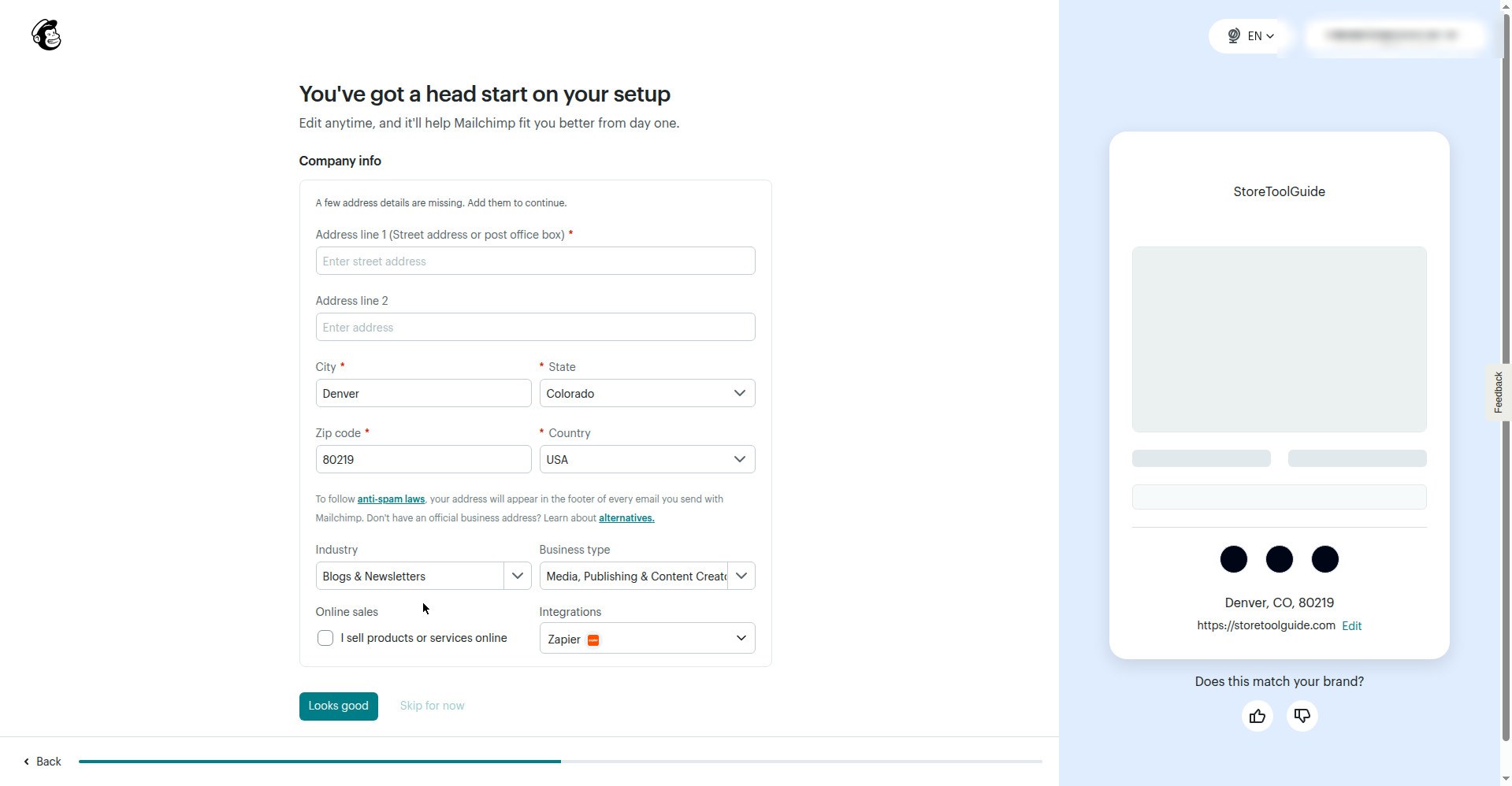
The final step of Mailchimp's free signup: a required street address field, a disabled 'Skip for now' button, and city, state and ZIP prefilled with a guessed Denver, Colorado address (screenshot, 2026-11-06)
Who should use Mailchimp?
- Sellers who mainly send newsletters rather than automated flows
- Stores with a list under 250 contacts
- Merchants who want an email tool independent of their store platform
- Beginners who want a familiar interface and plenty of documentation
Who should avoid Mailchimp?
- Stores that need abandoned cart or welcome automations on the free plan
- Sellers with a list larger than 250 contacts who cannot pay yet
- Stores with a list between 251 and 500 contacts, because there is no paid tier small enough to buy
- Anyone who needs a fixed, easily predictable monthly bill
Alternatives
If Mailchimp is not the right fit, compare these alternatives:
Final verdict
Mailchimp's advantage is that it works with any store and needs no platform connection, which makes it a safe default if you are not on Shopify. For ecommerce specifically the free plan is weaker than it looks: 250 contacts, 1 audience and 1 seat, with no automation flows at all. The last point is the one that matters, because a welcome email and an abandoned cart sequence are the two highest-return emails a small store can send, and neither is possible on the free plan. Two details are easy to miss. The paid plans start at 501 contacts, so a store that outgrows 250 contacts has no 251-to-500 tier to buy — it jumps straight to a tier sized for several hundred. And the free plan's send allowance is inconsistent on Mailchimp's own comparison page, quoted as both 500 and 1,000 sends a month; plan for 500. Omnisend's free plan includes automation, so if ecommerce automation is the goal, compare those two free plans before choosing on brand recognition.
Is Mailchimp right for your store?
Start by checking the current pricing, free plan limits, integrations, and whether the tool solves a problem you already have.
Related guides
Continue comparing ecommerce tools with related reviews, best lists, and side-by-side software comparisons.
Comparison
Mailchimp vs Omnisend: Email for Stores
Both free plans cap a full-size list at about two sends a month. The difference is Mailchimp excludes automation entirely, and Omnisend does not.
Tools Directory
Browse all ecommerce tool reviews
Explore individual software reviews for Shopify, Etsy, SEO, reviews, email marketing, product descriptions, and store growth.
Best Lists
Compare recommended ecommerce tools
Use curated best tool lists to compare several software options for a specific ecommerce task or seller type.
Comparisons
Compare similar tools side by side
Read direct comparisons when you are choosing between two similar tools or switching from one platform to another.
More research paths
You can also continue your research through the main tool directory, best lists, and comparison hub.
Tools Directory
Browse all ecommerce tool reviews
Explore individual software reviews for Shopify, Etsy, SEO, reviews, email marketing, product descriptions, and store growth.
Best Lists
Compare recommended ecommerce tools
Use curated best tool lists to compare several software options for a specific ecommerce task or seller type.
Comparisons
Compare similar tools side by side
Read direct comparisons when you are choosing between two similar tools or switching from one platform to another.
Frequently asked questions
Is Mailchimp free?
Yes, there is a free plan with no time limit that includes up to 250 contacts, 1 audience and 1 seat. It excludes marketing automation flows. Note that Mailchimp's plan-comparison page states the free plan's monthly send allowance twice with two different figures — 500 sends (250 per day) and 1,000 sends (500 per day) — so confirm the current number in your own account before relying on it.
How many emails can I send on Mailchimp's free plan?
Mailchimp does not give one consistent figure on its own site. Its plan-comparison page states 500 sends a month with a daily limit of 250 in one place, and 1,000 sends with a daily limit of 500 in another tooltip on the same page. Plan against 500. Because a campaign to 250 contacts counts as 250 sends, that is about two emails a month to a full-size free list.
Does the Mailchimp free plan include automations?
No. Marketing automation flows are not included on the free plan. They start on the Essentials plan, and Mailchimp caps Essentials at 4 steps per flow; Standard and Premium allow up to 200 steps per flow.
How much does Mailchimp cost?
Paid plans are Essentials, Standard and Premium, all priced by contact tier and shown in your local currency. The lowest tier on both the pricing page and the comparison page is 0 to 500 contacts, so paid coverage starts at 501 contacts — there is no tier that covers 251 to 500. Sends are set as a multiple of your contact count: Essentials 10x, Standard 12x, Premium 15x. Check the pricing page with your own currency selected for an exact figure.